
Prerequisites
To work with service programs, the role must have the following permissions enabled:
Under Service → Service Programs:
-
Read access – allows viewing the service program library
-
Read and write access – allows creating, editing, and deleting service programs
If the Service Programs tab is not visible, or you are unable to create new programs, an administrator must verify that the correct permissions are enabled for the role.
What is a service program?
A service program is a structured maintenance plan that defines which service tasks should be performed at specific intervals.
A service program can:
-
Follow manufacturer-recommended service intervals
-
Be customized to internal maintenance routines
-
Be assigned to one or more assets
-
Generate automatic service reminders
-
Be executed and documented via work orders
A correctly configured service program contributes to improved operations, documented maintenance, and warranty compliance.
How to do it
-
Navigate to Service from the main menu.
-
Select the Service Programs tab.
-
Click Add service program.
-
Fill in the required information in the form.
-
Click Create service program.
The service program will now be added to the library.
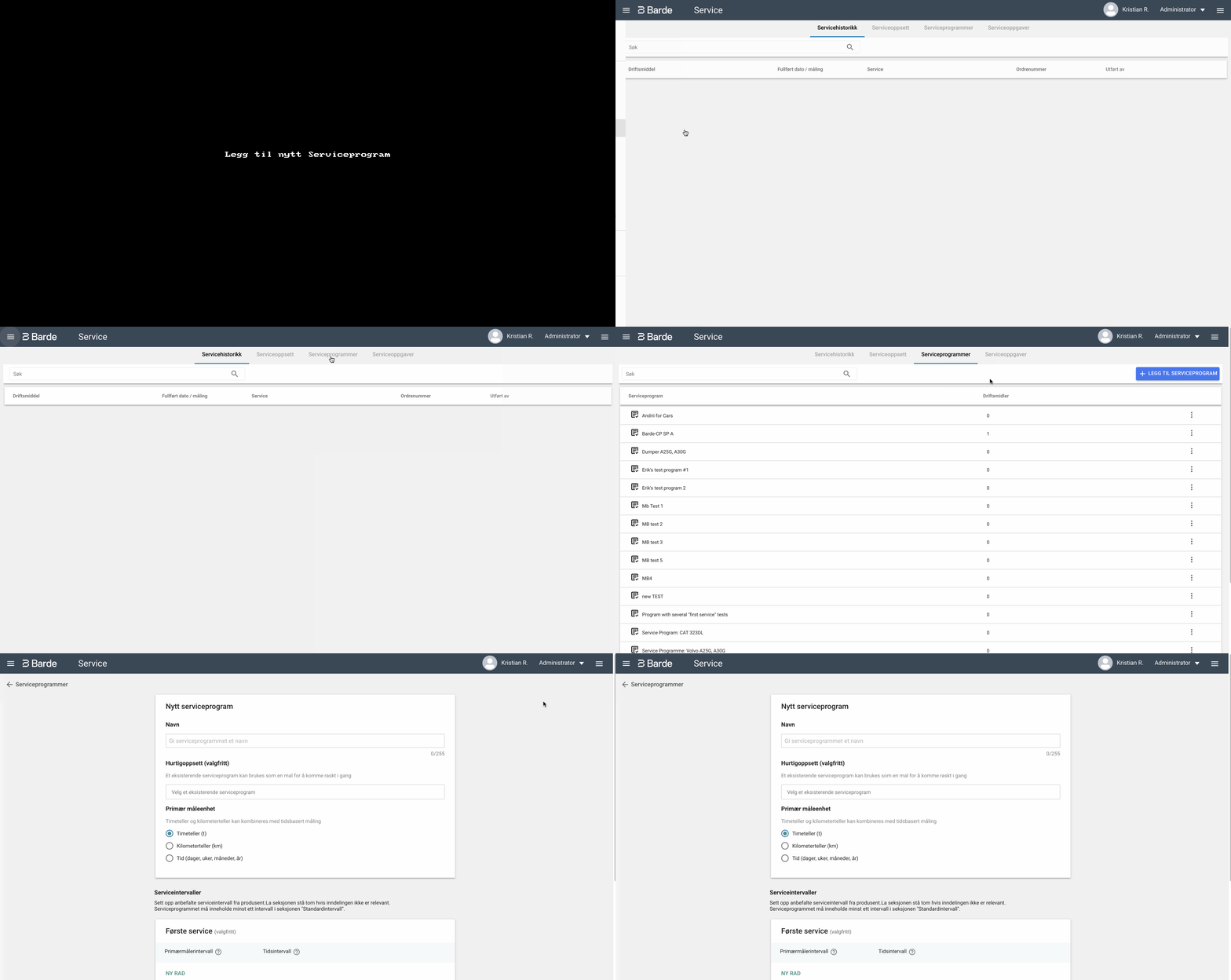
Important settings in the service program
Service program name
Provide a clear and descriptive name, for example based on manufacturer and model.
Examples:
-
Volvo EC140D / EC160D / EC180D
-
2020 Peugeot Partner
-
Husqvarna FS400LV Asphalt Saw
This makes it easier to find the correct service program later.
Quick setup (optional)
Quick setup allows you to copy intervals from an existing service program.
This is useful if:
-
You are creating a similar service program
-
Only minor adjustments are required
Important:
-
Quick setup copies only intervals
-
Service tasks are not copied
-
Intervals can be edited after copying
Program type
You must choose between a Fixed or Floating service program.
Fixed service program
Intervals follow a fixed structure regardless of when the service is actually performed.
Example:
At a 500-hour interval, if service is performed at 495 hours, the next service will still be at 1000 hours.
This provides:
-
Predictable intervals
-
A clear, manufacturer-based maintenance plan
Floating service program
The next interval is calculated based on when the service was actually performed.
Example:
At a 500-hour interval, if service is performed at 495 hours, the next service will be at 995 hours.
This provides:
-
Greater flexibility
-
Operational adaptability
When performing service via a work order, you can also manually adjust the next service due date.
Primary unit of measurement
Select which unit should be used for service intervals:
-
Hours (h)
-
Kilometers (km)
-
Time (days, weeks, months, or years)
Note:
If intervals should be measured both in hours/kilometers and time, select hours or kilometers as the primary unit. The time interval can be added when creating service intervals.
Example:
40,000 km or 2 years – whichever comes first.

Create service intervals
A service program must contain at least one interval in the Standard interval section.
You can configure intervals in three sections:
First service (optional)
This interval occurs only once.
Example:
First 500-hour service on a machine.
Standard interval (required)
These are recurring intervals throughout the asset’s lifetime.
Examples:
-
Every 250 hours
-
Every 500 hours
-
Every 12 months
Note:
If multiple intervals occur at the same time, the system will select the largest interval as the next service. Therefore, service tasks should also be added to the larger intervals if they are to be performed simultaneously.
Additional interval (optional)
Additional intervals are used for less frequent service tasks.
Examples:
-
Cleaning of diesel particulate filter
-
Replacement of spark plugs
These will be added on top of the standard intervals when they occur.


Result
When the service program is created:
-
It appears in the library under Service Programs
-
It can be assigned to one or more assets
-
Service intervals can generate service notifications and be included in work orders
Next steps
After creating the service program, you can add service tasks to the intervals.
See the next guide: